What is ScratchJr?
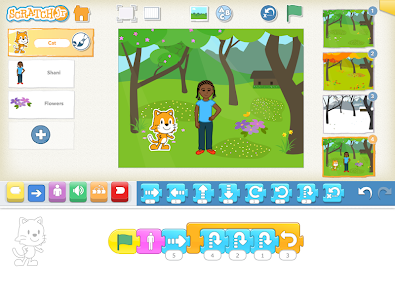
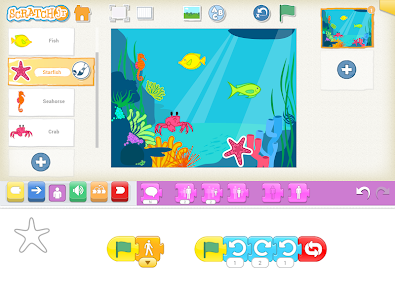
ScratchJr is a block-based programming app created for children ages 5–7. Instead of typing code, kids snap together colorful coding blocks to make characters move, jump, dance, and talk. They can design backgrounds, add dialogue, and create interactive stories or simple games.
Official Website: ScratchJr - Home
Download Links: iOS App Store | Google Play Store
Example Screenshots
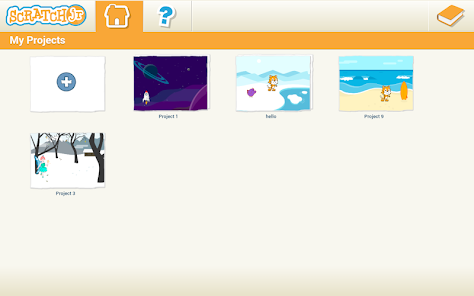
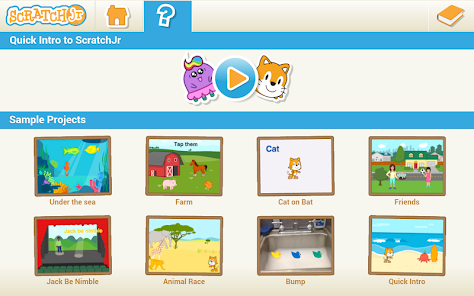
Here are some visuals to help you see what ScratchJr looks like in action:



Integrating ScratchJr into a Unit of Study
Imagine a unit on Community Helpers. Students could use ScratchJr to create short, animated stories where a firefighter, doctor, or teacher helps solve a problem.
Learning Objectives:
Develop computational thinking (sequencing, debugging, problem-solving).
Strengthen literacy by building narratives with a beginning, middle, and end.
Connect social studies content (community roles) with technology.
Encourage creativity and collaboration.
This activity blends storytelling with coding, showing students that programming isn’t just about computers, it’s about communication and creativity.
What Implementation Looks Like
Introduction: Start with a read-aloud or discussion about storytelling. Show a demo project in ScratchJr.
Set-Up: Make sure tablets are ready with ScratchJr installed. Provide headphones and a “coding corner” with visual aids.
Scaffolding & Differentiation:
Beginners: Move a character across the screen.
Intermediate: Add speech bubbles and backgrounds.
Advanced: Create multi-scene stories with loops.
Support: Pair students for peer mentoring and provide coding cards or visual guides for English language learners.
Video Tutorial for Teachers
Here’s a helpful video to get you started with ScratchJr in the classroom:
- This tutorial walks through how to make characters move, add backgrounds, and build simple projects step by step.
Assessing Student Learning
Assessment doesn’t have to be a test, it can be built into the creative process.
Observation Checklists: Track whether students can sequence blocks, debug, and explain their choices.
Student Reflection: Have students present their projects and describe their stories.
Artifacts: Save screenshots or recordings of projects.
Rubric Criteria: Creativity, literacy (clear narrative), coding skills, and collaboration.
Final Thoughts
ScratchJr is more than a coding app, it’s a literacy tool for the digital age. By integrating it into your classroom, you’re helping students learn to think, question, and create with fairness and empathy, while also preparing them for a world where technology and storytelling go hand in hand.

This is such a great breakdown of ScratchJr. You explain it in a way that makes it feel really accessible and fun for young kids. I love how you tied it into a Community Helpers unit because that’s such a natural way for students to mix storytelling with simple coding. Your implementation ideas make the whole thing feel totally doable, and it sounds like your students would have an awesome time creating their own little animated stories.
ReplyDeleteHi Jeanna,
ReplyDeleteI like how everything is organized, clear and informative. I also like how you mentioned that for assessing students, it doesn't necessary have to be the "traditional" way were used to. It can be based on creativity. This tool definitely provides them with the opportunity to do just that! I also appreciate the fact that it comes with a basic tutorial. Nice work!
Jeanna,
ReplyDeleteYour blog post about ScratchJr is a thoughtful and clear introduction to what the tool offers young learners. I appreciated how you explained that ScratchJr is a block-based programming app designed specifically for children, making it easy for them to animate characters, create stories, and explore the basics of coding. It’s also great that you recognized how its simple, icon-based design supports very young learners who may not yet be strong readers, allowing them to grasp programming ideas through visuals and experimentation.
Your emphasis on how ScratchJr supports foundational learning, such as sequencing, problem-solving, and early computational thinking, was especially strong. It’s clear that this kind of tool helps children understand core coding concepts while also giving them space to express ideas, tell stories, and explore their imagination. Reading your post made me curious about how you’ve seen children interact with ScratchJr in real settings. It would be interesting to hear whether you think young learners need adult support when they first begin, or if the interface is intuitive enough for them to explore independently. I also wonder how you see teachers using it, whether they might need training or whether most could incorporate it naturally into their classroom routines.
Another area that could be interesting to expand on is how children handle challenges while using the app. Debugging can be difficult even for older students, so I’d love to know how younger children respond when something in their project doesn’t work as expected. Do they experiment until they find a solution, or do they need guidance to understand why the program behaves the way it does? It might also be valuable to think about how ScratchJr projects could be connected to offline activities or follow-up discussions, giving learners a chance to reflect on what they created or explain the choices behind their code. Activities like “show and tell” presentations or simple story-mapping could deepen their understanding of the logic behind their animations.
Overall, your post provides a strong, accessible overview of ScratchJr and makes a compelling case for its value in early childhood learning. It introduces the tool clearly and enthusiastically, and with a few added examples or reflections about how children interact with it, it would become an even richer resource for readers.
Great blog post!
Yola