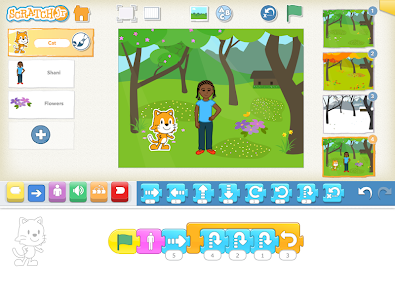
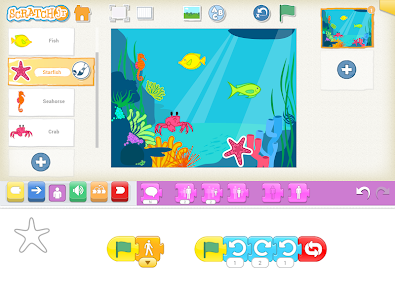
ScratchJr is a block-based programming app created for children ages 5–7. Instead of typing code, kids snap together colorful coding blocks to make characters move, jump, dance, and talk. They can design backgrounds, add dialogue, and create interactive stories or simple games.
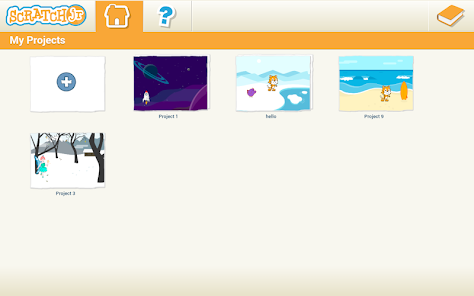
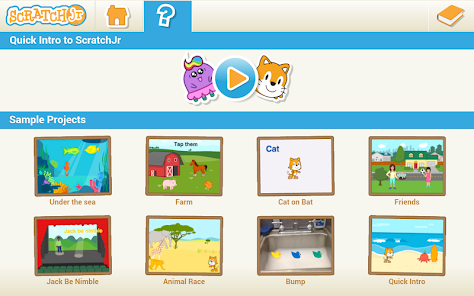
Here are some visuals to help you see what ScratchJr looks like in action:
Integrating ScratchJr into a Unit of Study
Imagine a unit on Community Helpers. Students could use ScratchJr to create short, animated stories where a firefighter, doctor, or teacher helps solve a problem.
Strengthen literacy by building narratives with a beginning, middle, and end.
Connect social studies content (community roles) with technology.
Encourage creativity and collaboration.
This activity blends storytelling with coding, showing students that programming isn’t just about computers, it’s about communication and creativity.
What Implementation Looks Like
Introduction: Start with a read-aloud or discussion about storytelling. Show a demo project in ScratchJr.
Set-Up: Make sure tablets are ready with ScratchJr installed. Provide headphones and a “coding corner” with visual aids.
Scaffolding & Differentiation:
Beginners: Move a character across the screen.
Intermediate: Add speech bubbles and backgrounds.
Advanced: Create multi-scene stories with loops.
Support: Pair students for peer mentoring and provide coding cards or visual guides for English language learners.
Video Tutorial for Teachers
Here’s a helpful video to get you started with ScratchJr in the classroom:
This tutorial walks through how to make characters move, add backgrounds, and build simple projects step by step.
Assessing Student Learning
Assessment doesn’t have to be a test, it can be built into the creative process.
Observation Checklists: Track whether students can sequence blocks, debug, and explain their choices.
Student Reflection: Have students present their projects and describe their stories.
Artifacts: Save screenshots or recordings of projects.
Rubric Criteria: Creativity, literacy (clear narrative), coding skills, and collaboration.
Final Thoughts
ScratchJr is more than a coding app, it’s a literacy tool for the digital age. By integrating it into your classroom, you’re helping students learn to think, question, and create with fairness and empathy, while also preparing them for a world where technology and storytelling go hand in hand.
Wednesday, November 5, 2025
Seesaw and ParentSquare are powerful tools that support communication, engagement, and learning in K–12 education. This case study explores their roles, benefits, challenges, and implications for educators, students, and families.
Case Study 1: Seesaw
Overview
Seesaw is a digital learning platform designed for PreK–6 classrooms. It functions as a learning management system (LMS), digital portfolio, and communication hub. Teachers use it to assign activities, assess student work, and share progress with families (Seesaw, 2025).
User Engagement
Students engage by submitting work through photos, videos, drawings, and voice recordings. Teachers provide feedback and track progress, while parents view updates and comment on their child’s work. This three-way interaction fosters a collaborative learning environment.
Influence on Communication
Seesaw shifts classroom communication from one-way announcements to interactive dialogue. Teachers can send messages, share student work, and receive responses from families. The platform supports multimodal communication (text, audio, and visual) which is especially helpful for younger learners and multilingual families.
Information Consumption
Students access assignments and resources through a personalized feed. Teachers curate content and monitor engagement. Parents consume information passively or actively, depending on their level of involvement. The platform encourages bite-sized learning and visual storytelling.
Impact on Learning
Positive effects include increased student voice, creativity, and ownership of learning. Seesaw’s multimodal tools support differentiated instruction and formative assessment. Challenges include over-reliance on digital submission and limited depth in some activities (Tech & Learning, 2023).
Privacy and Safety
Seesaw complies with FERPA and COPPA, offering secure logins and data protection. Teachers control what is shared and with whom. However, concerns remain about screen time and digital footprint, especially for younger students (Common Sense Education, 2023).
Required Literacies
Users need digital literacy (navigating apps, uploading content), visual literacy (interpreting images/videos), and communication literacy (giving feedback, responding appropriately). These skills help students express themselves clearly and help parents engage meaningfully.
Reflection
Seesaw aligns with goals of personalized learning, family engagement, and formative assessment. Educators can use it to showcase student growth and differentiate instruction. Parents play a key role by viewing and responding to their child’s work, reinforcing learning at home.
🔗
🔗
Case Study 2: ParentSquare
Overview
ParentSquare is a unified communication platform for K–12 schools. It centralizes messaging, announcements, attendance, forms, and event coordination. It’s designed to engage every family, regardless of language or access barriers (ParentSquare, 2025).
User Engagement
Teachers and administrators send messages, share updates, and request forms. Parents receive notifications via email, text, or app, and can respond, sign up, or ask questions. Students are indirectly involved through parent-teacher coordination.
Influence on Communication
ParentSquare streamlines school-to-home communication. It replaces fragmented emails and paper notes with a centralized, trackable system. The platform supports two-way communication and automatic translation in over 100 languages, making it inclusive and accessible (Cheshire Public Schools, 2025).
Information Consumption
Parents consume school information through personalized feeds. They access calendars, permission slips, and announcements in one place. Teachers and staff monitor engagement and follow up with families who haven’t responded.
Impact on Learning
Positives include improved parent involvement, faster response times, and reduced miscommunication. Negatives may include information overload or passive engagement if parents rely solely on notifications without deeper involvement (Forbes, 2024).
Privacy and Safety
ParentSquare is FERPA-compliant and uses secure logins. It offers privacy controls and tracks communication equity. Still, schools must ensure families understand how their data is used and how to manage settings (Learning Counsel, 2025).
Required Literacies
Users need platform literacy (navigating the app), communication literacy (responding clearly), and cultural literacy (understanding school norms). These help families stay informed and involved in their child’s education.
Reflection
ParentSquare supports educational goals of transparency, equity, and engagement. Educators can use it to build stronger relationships with families. Parents play a vital role by staying informed, responding to requests, and participating in school life.
🔗
Conclusion
Seesaw and ParentSquare have become essential tools in my daily life—both as a teacher and as a parent. In my classroom, Seesaw allows me to create engaging, student-centered learning experiences while keeping families in the loop with real-time updates and student work. As a parent, I appreciate how easy it is to stay connected to my child’s learning journey and communicate with their teachers in a meaningful way.
Using both platforms has shown me how powerful digital tools can be when they’re used with purpose. They support collaboration, build stronger relationships, and help students feel seen and supported. As technology continues to evolve, platforms like Seesaw and ParentSquare will remain key to creating connected, informed, and engaged school communities.
References
Common Sense Education. (2023). Teachers' essential guide to Seesaw.
ParentSquare. (2025). Unify all communication tools.