Seesaw and ParentSquare are powerful tools that support communication, engagement, and learning in K–12 education. This case study explores their roles, benefits, challenges, and implications for educators, students, and families.
Case Study 1: Seesaw
Overview
Seesaw is a digital learning platform designed for PreK–6 classrooms. It functions as a learning management system (LMS), digital portfolio, and communication hub. Teachers use it to assign activities, assess student work, and share progress with families (Seesaw, 2025).
User Engagement
Students engage by submitting work through photos, videos, drawings, and voice recordings. Teachers provide feedback and track progress, while parents view updates and comment on their child’s work. This three-way interaction fosters a collaborative learning environment.
Influence on Communication
Seesaw shifts classroom communication from one-way announcements to interactive dialogue. Teachers can send messages, share student work, and receive responses from families. The platform supports multimodal communication (text, audio, and visual) which is especially helpful for younger learners and multilingual families.
Information Consumption
Students access assignments and resources through a personalized feed. Teachers curate content and monitor engagement. Parents consume information passively or actively, depending on their level of involvement. The platform encourages bite-sized learning and visual storytelling.
Impact on Learning
Positive effects include increased student voice, creativity, and ownership of learning. Seesaw’s multimodal tools support differentiated instruction and formative assessment. Challenges include over-reliance on digital submission and limited depth in some activities (Tech & Learning, 2023).
Privacy and Safety
Seesaw complies with FERPA and COPPA, offering secure logins and data protection. Teachers control what is shared and with whom. However, concerns remain about screen time and digital footprint, especially for younger students (Common Sense Education, 2023).
Required Literacies
Users need digital literacy (navigating apps, uploading content), visual literacy (interpreting images/videos), and communication literacy (giving feedback, responding appropriately). These skills help students express themselves clearly and help parents engage meaningfully.
Reflection
Seesaw aligns with goals of personalized learning, family engagement, and formative assessment. Educators can use it to showcase student growth and differentiate instruction. Parents play a key role by viewing and responding to their child’s work, reinforcing learning at home.
🔗 🔗


Case Study 2: ParentSquare
Overview
ParentSquare is a unified communication platform for K–12 schools. It centralizes messaging, announcements, attendance, forms, and event coordination. It’s designed to engage every family, regardless of language or access barriers (ParentSquare, 2025).
User Engagement
Teachers and administrators send messages, share updates, and request forms. Parents receive notifications via email, text, or app, and can respond, sign up, or ask questions. Students are indirectly involved through parent-teacher coordination.
Influence on Communication
ParentSquare streamlines school-to-home communication. It replaces fragmented emails and paper notes with a centralized, trackable system. The platform supports two-way communication and automatic translation in over 100 languages, making it inclusive and accessible (Cheshire Public Schools, 2025).
Information Consumption
Parents consume school information through personalized feeds. They access calendars, permission slips, and announcements in one place. Teachers and staff monitor engagement and follow up with families who haven’t responded.
Impact on Learning
Positives include improved parent involvement, faster response times, and reduced miscommunication. Negatives may include information overload or passive engagement if parents rely solely on notifications without deeper involvement (Forbes, 2024).
Privacy and Safety
ParentSquare is FERPA-compliant and uses secure logins. It offers privacy controls and tracks communication equity. Still, schools must ensure families understand how their data is used and how to manage settings (Learning Counsel, 2025).
Required Literacies
Users need platform literacy (navigating the app), communication literacy (responding clearly), and cultural literacy (understanding school norms). These help families stay informed and involved in their child’s education.
Reflection
ParentSquare supports educational goals of transparency, equity, and engagement. Educators can use it to build stronger relationships with families. Parents play a vital role by staying informed, responding to requests, and participating in school life.


🔗
Conclusion
Seesaw and ParentSquare have become essential tools in my daily life—both as a teacher and as a parent. In my classroom, Seesaw allows me to create engaging, student-centered learning experiences while keeping families in the loop with real-time updates and student work. As a parent, I appreciate how easy it is to stay connected to my child’s learning journey and communicate with their teachers in a meaningful way.
Using both platforms has shown me how powerful digital tools can be when they’re used with purpose. They support collaboration, build stronger relationships, and help students feel seen and supported. As technology continues to evolve, platforms like Seesaw and ParentSquare will remain key to creating connected, informed, and engaged school communities.
References
Common Sense Education. (2023). Teachers' essential guide to Seesaw.
ParentSquare. (2025). Unify all communication tools.
Seesaw. (2025). Elementary learning experience platform.
Tech & Learning. (2023). Seesaw for schools: How to use it for teaching.
Robinson, Z., & Robinson, P. (2021). Using social media tools for promoting critical literacy skills in the classroom.
Stengel, G. (2024). ParentSquare: One-stop shop for K12 school-family communications. Forbes.
Cheshire Public Schools. (2025). ParentSquare overview.

I really liked your post and how you broke down both Seesaw and ParentSquare. You captured exactly how these tools make communication and engagement so much easier for teachers and families. I use both too, and I totally agree that they serve different but complementary roles, Seesaw is great for student-centered learning, while ParentSquare keeps parents in the loop on everything else.
ReplyDeleteI especially liked how you mentioned Seesaw giving students a voice. It’s amazing to see how proud they get when they can share their work through photos or voice recordings. And the translation feature in ParentSquare is such a game-changer for families who speak different languages, it really helps build a stronger sense of connection and inclusion.
I also agree with your point about information overload. Sometimes there’s so much communication that it can feel hard to keep up, but I’d still rather have that than families feeling out of the loop. Overall, you summed it up perfectly when used with purpose, these tools make a big difference in keeping everyone connected and involved.
Jeanna
ReplyDeleteThank you for sharing such an insightful and well-organized analysis of Seesaw and ParentSquare. I have used both of these tools in my career. I really appreciate how you highlighted not only the features and benefits of each platform but also their deeper implications for communication, engagement, and learning.
Your breakdown of user engagement and required literacies is especially valuable, it is easy to focus on the technology itself and overlook the digital, visual, and communication skills needed for students, teachers, and families to use these tools effectively. I also like how you acknowledged the balance between convenience and potential challenges, such as screen time, data privacy, and maintaining meaningful engagement.
I completely agree that when used intentionally, platforms like Seesaw and ParentSquare can transform the school-home connection. It really improved the connection I made with my families and increased parent involvement and engagement. Seesaw empowers student voice and creativity, while ParentSquare strengthens trust and transparency between families and schools. Together, they help build a holistic ecosystem where learning and communication flow seamlessly.
Thank you for capturing both the practical and human sides of educational technology. Your reflections remind us that digital tools are most powerful when they foster genuine relationships and shared understanding among teachers, students, and families. You have written a really great blog post for this module's blog.
Yola
Hi Jeanna,
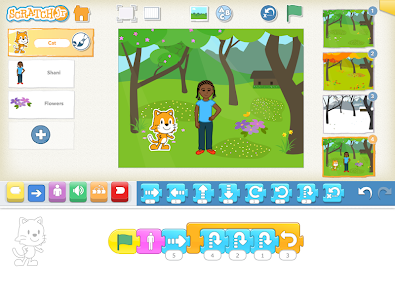
ReplyDeleteI really enjoyed reading your post! You explained Seesaw and ParentSquare so clearly, and the photo examples you included were incredibly helpful. They made it so easy to visualize how these platforms look in real classroom settings and how they actually support communication between students, teachers, and families. Seeing those visuals helped me understand the full potential of each tool far better than a written description alone.
Your point about Seesaw creating two-way communication really stood out to me. I don’t currently use Seesaw in my classroom, but after reading your post, I’m seriously considering it. I love the idea of students recording their voices or posting photos of their work so families can see their growth throughout the week. I can already imagine how much pride that would bring to my students and how it could strengthen our home-school connection.
I also appreciated how you described ParentSquare as an equity tool. The translation feature is such an important support for multilingual families, and I can see how it helps build stronger and more trusting relationships between schools and caregivers.
I’m curious, how do you introduce these platforms to families at the start of the year so they feel comfortable using them? And what strategies have worked best for keeping communication consistent without overwhelming parents?
Sasha,
DeleteThank you for you post! At the start of each year at meet the teacher we have QR codes out for Seesaw so that parents can make sure they are set up to receive notifications. I also like to check in with all family members within the first few weeks to make sure that everyone that wants access has it. I try to make it as parent friendly and smooth as possible.