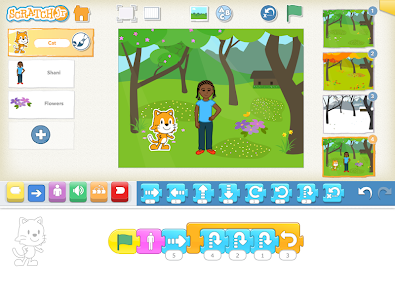
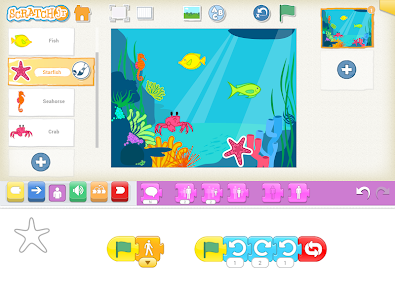
ScratchJr is a block-based programming app created for children ages 5–7. Instead of typing code, kids snap together colorful coding blocks to make characters move, jump, dance, and talk. They can design backgrounds, add dialogue, and create interactive stories or simple games.
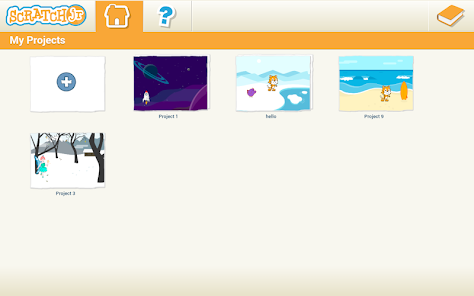
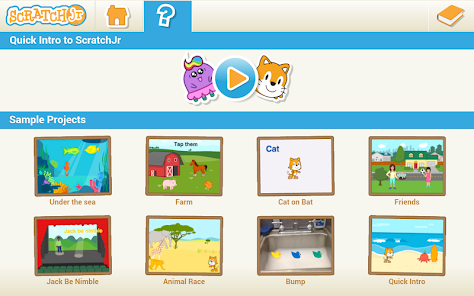
Here are some visuals to help you see what ScratchJr looks like in action:
Integrating ScratchJr into a Unit of Study
Imagine a unit on Community Helpers. Students could use ScratchJr to create short, animated stories where a firefighter, doctor, or teacher helps solve a problem.
Strengthen literacy by building narratives with a beginning, middle, and end.
Connect social studies content (community roles) with technology.
Encourage creativity and collaboration.
This activity blends storytelling with coding, showing students that programming isn’t just about computers, it’s about communication and creativity.
What Implementation Looks Like
Introduction: Start with a read-aloud or discussion about storytelling. Show a demo project in ScratchJr.
Set-Up: Make sure tablets are ready with ScratchJr installed. Provide headphones and a “coding corner” with visual aids.
Scaffolding & Differentiation:
Beginners: Move a character across the screen.
Intermediate: Add speech bubbles and backgrounds.
Advanced: Create multi-scene stories with loops.
Support: Pair students for peer mentoring and provide coding cards or visual guides for English language learners.
Video Tutorial for Teachers
Here’s a helpful video to get you started with ScratchJr in the classroom:
This tutorial walks through how to make characters move, add backgrounds, and build simple projects step by step.
Assessing Student Learning
Assessment doesn’t have to be a test, it can be built into the creative process.
Observation Checklists: Track whether students can sequence blocks, debug, and explain their choices.
Student Reflection: Have students present their projects and describe their stories.
Artifacts: Save screenshots or recordings of projects.
Rubric Criteria: Creativity, literacy (clear narrative), coding skills, and collaboration.
Final Thoughts
ScratchJr is more than a coding app, it’s a literacy tool for the digital age. By integrating it into your classroom, you’re helping students learn to think, question, and create with fairness and empathy, while also preparing them for a world where technology and storytelling go hand in hand.
Wednesday, November 5, 2025
Seesaw and ParentSquare are powerful tools that support communication, engagement, and learning in K–12 education. This case study explores their roles, benefits, challenges, and implications for educators, students, and families.
Case Study 1: Seesaw
Overview
Seesaw is a digital learning platform designed for PreK–6 classrooms. It functions as a learning management system (LMS), digital portfolio, and communication hub. Teachers use it to assign activities, assess student work, and share progress with families (Seesaw, 2025).
User Engagement
Students engage by submitting work through photos, videos, drawings, and voice recordings. Teachers provide feedback and track progress, while parents view updates and comment on their child’s work. This three-way interaction fosters a collaborative learning environment.
Influence on Communication
Seesaw shifts classroom communication from one-way announcements to interactive dialogue. Teachers can send messages, share student work, and receive responses from families. The platform supports multimodal communication (text, audio, and visual) which is especially helpful for younger learners and multilingual families.
Information Consumption
Students access assignments and resources through a personalized feed. Teachers curate content and monitor engagement. Parents consume information passively or actively, depending on their level of involvement. The platform encourages bite-sized learning and visual storytelling.
Impact on Learning
Positive effects include increased student voice, creativity, and ownership of learning. Seesaw’s multimodal tools support differentiated instruction and formative assessment. Challenges include over-reliance on digital submission and limited depth in some activities (Tech & Learning, 2023).
Privacy and Safety
Seesaw complies with FERPA and COPPA, offering secure logins and data protection. Teachers control what is shared and with whom. However, concerns remain about screen time and digital footprint, especially for younger students (Common Sense Education, 2023).
Required Literacies
Users need digital literacy (navigating apps, uploading content), visual literacy (interpreting images/videos), and communication literacy (giving feedback, responding appropriately). These skills help students express themselves clearly and help parents engage meaningfully.
Reflection
Seesaw aligns with goals of personalized learning, family engagement, and formative assessment. Educators can use it to showcase student growth and differentiate instruction. Parents play a key role by viewing and responding to their child’s work, reinforcing learning at home.
🔗
🔗
Case Study 2: ParentSquare
Overview
ParentSquare is a unified communication platform for K–12 schools. It centralizes messaging, announcements, attendance, forms, and event coordination. It’s designed to engage every family, regardless of language or access barriers (ParentSquare, 2025).
User Engagement
Teachers and administrators send messages, share updates, and request forms. Parents receive notifications via email, text, or app, and can respond, sign up, or ask questions. Students are indirectly involved through parent-teacher coordination.
Influence on Communication
ParentSquare streamlines school-to-home communication. It replaces fragmented emails and paper notes with a centralized, trackable system. The platform supports two-way communication and automatic translation in over 100 languages, making it inclusive and accessible (Cheshire Public Schools, 2025).
Information Consumption
Parents consume school information through personalized feeds. They access calendars, permission slips, and announcements in one place. Teachers and staff monitor engagement and follow up with families who haven’t responded.
Impact on Learning
Positives include improved parent involvement, faster response times, and reduced miscommunication. Negatives may include information overload or passive engagement if parents rely solely on notifications without deeper involvement (Forbes, 2024).
Privacy and Safety
ParentSquare is FERPA-compliant and uses secure logins. It offers privacy controls and tracks communication equity. Still, schools must ensure families understand how their data is used and how to manage settings (Learning Counsel, 2025).
Required Literacies
Users need platform literacy (navigating the app), communication literacy (responding clearly), and cultural literacy (understanding school norms). These help families stay informed and involved in their child’s education.
Reflection
ParentSquare supports educational goals of transparency, equity, and engagement. Educators can use it to build stronger relationships with families. Parents play a vital role by staying informed, responding to requests, and participating in school life.
🔗
Conclusion
Seesaw and ParentSquare have become essential tools in my daily life—both as a teacher and as a parent. In my classroom, Seesaw allows me to create engaging, student-centered learning experiences while keeping families in the loop with real-time updates and student work. As a parent, I appreciate how easy it is to stay connected to my child’s learning journey and communicate with their teachers in a meaningful way.
Using both platforms has shown me how powerful digital tools can be when they’re used with purpose. They support collaboration, build stronger relationships, and help students feel seen and supported. As technology continues to evolve, platforms like Seesaw and ParentSquare will remain key to creating connected, informed, and engaged school communities.
References
Common Sense Education. (2023). Teachers' essential guide to Seesaw.
ParentSquare. (2025). Unify all communication tools.
For my project, I’ve decided to explore both the benefits and possible drawbacks of using Minecraft Education in the classroom. Since my district is starting to roll it out more widely, I want to understand how it works and what it can offer before I jump in myself. From what I’ve read so far, Minecraft Education seems to support a wide range of learning areas - like STEM, problem-solving, literacy, storytelling, math, social-emotional learning, science, and even history.
It makes me wonder: can one program really do all that? This is where I sometimes struggle with technology. I see the value in digital tools, but I also believe that traditional methods like writing with pen and paper are still really important. I want to find a balance that works for my students.
I’m especially interested in learning more about how Minecraft Education can support curriculum goals, boost student engagement, and help with differentiated instruction. After reading some articles, I’m now looking into professional development opportunities to build my skills with Minecraft and dig deeper into how it can enhance my teaching.
Slattery, E. J., Butler, D., O’Leary, M., & Marshall, K. (2023). Primary school students’ experiences using Minecraft Education during a national project-based initiative: An Irish study.TechTrends, 67(6), 1051–1063. https://doi.org/10.1007/s11528-023-00851-z
This study explores how primary school students across Ireland engaged with Minecraft Education as part of a national project-based learning initiative called “Ireland’s Future is MINE.” Using a mixed-methods approach, the researchers gathered data from student surveys and focus groups to assess the educational impact of digital game-based learning. The findings highlight the potential of Minecraft Education to foster creativity, collaboration, and digital literacy among young learners. The study also discusses challenges such as technical issues and varying levels of teacher confidence. This article is valuable for educators and policymakers interested in integrating game-based learning tools into primary education to enhance student engagement and 21st-century skills development.
Panja, V., & Berge, J. (2021). Minecraft Education Edition’s ability to create an effective and engaging learning experience. Journal of Student Research, 10(2). https://doi.org/10.47611/jsrhs.v10i2.1697
This study investigates the educational potential of Minecraft Education Edition, specifically its chemistry features, to create engaging and effective learning experiences. Conducted by high school researchers, the project evaluates how game-based learning can support student-centered instruction in STEM subjects. The authors found that Minecraft’s interactive and immersive environment enhances student motivation, understanding, and retention of complex concepts. The article contributes to the growing body of research supporting digital game-based learning and offers insights for educators seeking innovative tools to enrich science education.
Ellison, T. L., Evans, J. N., & Pike, J. (2016). Minecraft, teachers, parents, and learning: What they need to know and understand. Journal of Technology and Teacher Education, 24(3), 295–301. Retrieved from ERIC
This article examines how Minecraft serves as a bridge between in-school and out-of-school learning environments, offering insights into how teachers and parents perceive and support its educational use. The authors outline six principles for integrating Minecraft effectively in classrooms, emphasizing its potential to foster creativity, collaboration, and problem-solving. They also discuss the importance of understanding the cultural and social dynamics of gaming to better support student engagement. This resource is particularly useful for educators and parents seeking to leverage digital games as meaningful learning tools.
Klonou, P., Karatrantou, A., & Tranta, P. (2025). Kindergarten teachers' acceptance of educational robotics online tools for computational thinking. International Journal of Technology in Education and Science, 9(4), 579–596. Retrieved from ERIC
This study investigates how kindergarten teachers perceive and accept online educational robotics tools designed to foster computational thinking (CT) in early childhood education. Using a quantitative methodology, the authors assess factors influencing teachers’ intention to use three specific robotics platforms. The findings reveal that perceived usefulness, ease of use, and prior experience significantly affect acceptance levels. The study underscores the importance of professional development and support in integrating CT into early learning environments. This article is particularly relevant for educators, curriculum designers, and policymakers aiming to introduce technology-enhanced learning in kindergarten settings.
Tagnin, L., & Ní Ríordáin, M. (2021). Building science through questions in Content and Language Integrated Learning (CLIL) classrooms. International Journal of STEM Education, 8, Article 34. https://doi.org/10.1186/s40594-021-00287-2
This article explores how questioning strategies in CLIL classrooms can enhance science learning among multilingual students. The authors analyze classroom interactions to identify how teachers use questions to scaffold scientific thinking and language development simultaneously. Their findings suggest that effective questioning not only supports conceptual understanding but also fosters student engagement and language acquisition. This study is particularly relevant for educators working in linguistically diverse settings, offering insights into integrating STEM content with language instruction to promote deeper learning.
Designing to support practices beyond the screen means recognizing that literacy development in young children is deeply connected to play, storytelling, and their everyday interactions with media. Coggin et al. (2014) emphasize that children are not just passive viewers of popular media, they actively engage with it, remix it, and use it to express their ideas. By incorporating play-based filmmaking and media into the classroom, educators can create rich literacy experiences that go beyond traditional reading and writing. To engage students in meaningful conversations about new literacy practices, we can build on their natural interests in characters, stories, and digital tools. When children are invited to create their own films or retell familiar stories using media, they begin to understand narrative structure, visual communication, and audience awareness. These conversations become opportunities to explore how stories are built, how messages are shared, and how their own voices matter. Equity and engagement are important considerations. Coggin et al. (2014) note that popular media can serve as a bridge between home and school, especially for children whose cultural experiences may not be reflected in traditional curriculum materials. By allowing students to choose media that resonates with them, we support inclusive learning and recognize diversity. At the same time, we must ensure that all students have access to the tools and support they need to participate fully—whether through shared devices, collaborative work, or low-tech alternatives. An activity that I have used in the past is to “Remix a Story”. My students choose a favorite story or media character and create their own version using both analog and digital tools. First, they plan and draw/sketch a: storyboard on paper, imagining new adventures or endings for familiar characters. Next using classroom tablets students act out or narrate their stories, adding props or drawings. Finally, the students present their films to the class and discuss what they changed and why they made those choices. This activity reflects Coggin et al.’s (2014) findings that play-based filmmaking supports literacy by encouraging creativity, collaboration, and critical thinking. It also helps students see themselves as storytellers and media makers, not just consumers—an important step in developing new literacy skills. References Coggin, L. S., Wohlwend, K. E., Buchholz, B. A., Wessel Powell, C. L., & Husbye, N. E. (2014). Expanding early childhood literacy curriculum through play-based film-making and popular media. In ECEA Yearbook (Vol. 3, pp. 37–48). Information Age Publishing
This week's readings sparked reflection on how the digital advances create new practices, literacies, and contexts. Teaching isn't static anymore, it's evolving right alongside technology. As an elementary educator, I stand before my students each day and feel that dual responsibility weighing on my shoulders. I feel obligated to teach both curriculum content and essential life skills my students will need throughout their education.
While reading thru the Digital Literacy article (Vanek, 2019) it struck me that I am responsible for making sure my students gain the skills and the knowledge on the proper ways to use technology, find information, and how to use it all. When my students are doing their research unit we are teaching them to find information on certain apps/websites, but what we should also include is how to make sure the information that they are looking at is reputable and from a trusted source. I know that this year I would like to integrate more of a paper approach to their research by bringing them to the library, so that both avenues are available (paper and digital). Students need more than just tech skills to handle today's digital world. Even though students learn how to use touchscreens and other technology early, they also need to know how to think critically about all the information and media they encounter online.
When reading thru the Literacy Leadership Brief (2018), what caught my attention most is how teachers are trying to find the balance between digital and paper. Cell phones in schools have become a hot button issue recently, my district included. I feel cell phones in the classroom is a double-edged sword. They can be great for gathering quick information, but they can also be used negatively towards others. Many students choose not to speak much throughout the day and can simply just text each other. I truly believe that this has caused a negative impact on communication because many people are losing the skills to speak to and in front of others. I know that with this cell phone ban in schools during lunch and free periods many students are starting to interact more with each other, and this is helping them figure out how to appropriately communicate with someone, i.e. eye contact, and this is an important skill to have as they move forward. At the same time with this restriction comes a few losses as well. My daughter is a sophomore and has dyslexia, so during her free periods she would listen to books on her phone, as of right now there is no work around for her as her laptop cannot access the sites that she uses. (Our district has also banned YouTube on student devices). As a teacher in younger grades cell phones are not much of an issue but we do use a lot of technology. In our district we use Seesaw and iReady primarily. Seesaw is nice because students can interact with each other's work as well as parents. I know that as I introduce the app I also introduce the expectations for commenting on another students work. I also moderate the comments and can intervene when necessary, although I haven't as of yet.
Without even thinking about it digital literacy has become an integral part of our everyday lives. As our students grow so does their technological knowledge and with this comes our responsibility along with parents to educate them on proper usage and to guide them on their digital journey. Yet amid this evolution it is our responsibility as educators to keep exposing our students to the paper aspect of reading and writing. We must continue to place real books in their hands and pencils to paper, preserving the essence of literacy. There can be something said about putting pen to paper or cracking open a new book.
International Literacy Association. (2018). Improving Digital Practices for Literacy, Learning, and Justice: More Than Just Tools. Retrieved from: https://www.literacyworldwide.org/docs/default-source/where-we-stand/ila-improving-digital-practices-literacy-learning-justice.pdf
Vanek, J. (2019) Digital Literacy. Retrieved from: https://www.air.org/sites/default/files/TSTMDigitalLiteracyBrief-508.pdf
I try to use lots of new reading and writing methods in my 2nd grade classroom. My students will need more than just basic reading and writing skills as they grow up. Right now, they mostly take in information, but soon they'll need to sort through what they hear and read to make their own stuff. They don't create much for others to see at school, but I think many are making things at home they might not fully get. It's amazing how fast kids learn new tech! My students use programs like iReady, Seesaw, Minecraft for school, and other websites that help with reading, writing, and typing. One of the reasons I am most looking forward to this class is to help me learn more information on new technologies and ways that I can use them in my classrooms.
Literacy, defined as just reading and writing English print, creates invisible barriers in our classrooms (NCTE, 2019). This restrictive definition doesn't just limit student potential, it actively undermines our commitment to equity, dismissing the rich tapestry of knowledge and cultural expressions that could otherwise grow within our schools. We need more expansive ideas of new literacies and multi literacies because as we face misinformation, digital manipulation, and educational inequalities, it is apparent that skills-based literacy instruction alone is inadequate. As our digital world grows so must our exposure to all that is "written" no matter what generations before us might believe. We need to start incorporating as much digital exposure in a meaningful way so that as our students grow they are able to adapt to, learn from, and recognize important information from reliable sources.
References:
National Council of Teachers of English. (2019, November 7). Definition of literacy in a digital age.
My name is Jeanna Woods. 2 years ago I had a life changing experience and switched careers from assistant director of a childcare program to a TA in my local school district. Once there I realized that I could reinstate my certification and start teaching in the classroom. So I spent that half of that first year as a long term sub in a Kindergarten classroom. When a 2nd grade teacher moved out of district I jumped at the chance to have my own room. I am now currently a second year teacher in the finger lakes area, teaching 2nd grade in a CT classroom. I chose to pursue my master's in education so that I could obtain my professional teaching certificate, I chose curriculum and instruction as I believe that this is where I can learn and apply the most to my current classroom.
I am excited to learn in this course as technology is always something that I feel like I am behind on, especially in the classroom. I am hoping that I can gain some knowledge and experience that I can integrate into my classroom and pass on to the parents.
I am a mom to one teenager that is involved with sports, music and scouts so I am constantly on the go. In my free time I am an avid reader, love to go camping and kayaking in the summer, and just spending time with my family.